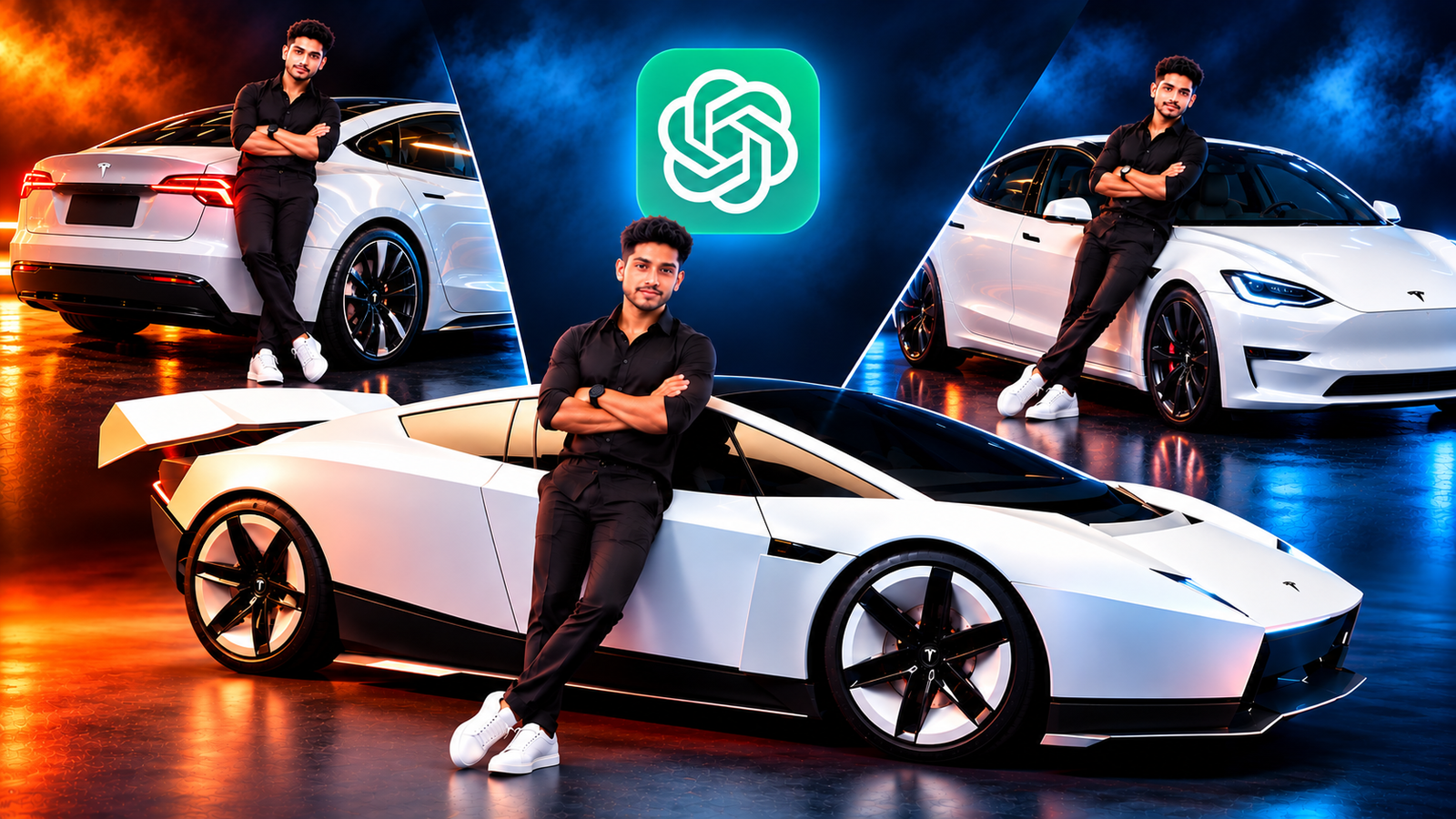
Have you ever wanted a stylish photo of yourself standing beside a luxury car, surrounded by dramatic neon lights and colorful smoke? You don’t need to rent an expensive car or visit a professional photography studio anymore. With AI photo editing, you can create this cinematic look using your own photo and a well-written prompt.
The combination of a white Tesla, red and blue lighting, a black outfit, and a glossy floor creates a premium automotive photoshoot effect. This style is perfect for anyone who wants to experiment with creative portraits for Instagram, profile pictures, or personal projects.
Sabse achhi baat ye hai ki aapko professional photographer hone ki zaroorat nahi hai. Just upload your photo, copy the prompt, and let AI create a new look based on your instructions.
In this guide, you’ll find the best cinematic Tesla car photoshoot prompt, easy steps to create your image using ChatGPT, and useful tips to achieve a more realistic result.
What Is a Cinematic Tesla Car Photoshoot with AI?
A cinematic Tesla car photoshoot is an AI-generated or AI-edited image that combines luxury automotive styling with dramatic lighting and fashion photography.
Imagine yourself wearing a fitted black shirt, black trousers, and white sneakers while standing confidently beside a white Tesla. Red smoke fills one side of the background, blue smoke covers the other, and neon lights reflect across a shiny, wet floor.
This combination gives the image a dramatic, movie-like appearance.
Normally, creating this type of photo would require a suitable car, a studio, professional lighting equipment, and a photographer. Lekin AI ki help se aap apni normal photo ko ek creative luxury-style portrait mein transform karne ki koshish kar sakte ho.
The final result depends on your reference photo, the prompt, and the image editing features available in your AI tool.
Best Cinematic Tesla Car Photoshoot AI Prompt
Ready to create your own luxury car portrait? Use the prompt below with your reference photo.
Copy and Paste This Prompt
AI Photo Editing Prompt:
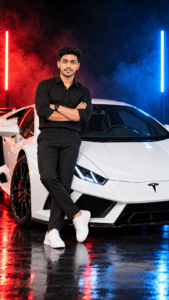
Create an ultra-realistic cinematic 9:16 full-body portrait of the person from the uploaded photo, confidently leaning against a white Lamborghini Huracán-style supercar with a black Tesla logo. Wearing a black shirt, black trousers, white sneakers, and a black wristwatch, with arms crossed and legs casually crossed. Dark luxury studio background with red smoke and neon lighting on the left, blue smoke and neon lighting on the right, vertical LED lights, and a glossy reflective floor. Front three-quarter car angle, realistic proportions, professional DSLR photography, 4K ultra-HD.
IMPORTANT: Preserve the person's original face and identity exactly as in the reference photo. Do not change facial features, hairstyle, beard, skin tone, or face shape. No face swapping or beautification. Maintain natural body proportions, realistic head-to-body ratio, and proper alignment with the car.Tip: You can change the car color, outfit, or background according to your preference. For example, replace the white Tesla with a black luxury car or use purple and blue lighting instead of red and blue.
How to Create a Cinematic Tesla Car Photoshoot Using ChatGPT
Follow these simple steps to create your own AI photoshoot.
Step 1: Open ChatGPT
Visit ChatGPT and start a new conversation. Make sure your account supports image uploads and the image-generation or editing features you need.
Step 2: Upload Your Reference Photo
Click the plus (+) or attachment icon and select a clear photo from your device.
Choose a photo where your face is visible and the lighting is good. A full-body reference can also help if you want the final image to show your complete outfit.
Step 3: Copy the Prompt
Copy the complete cinematic Tesla prompt from the section above. Paste it into the conversation with your uploaded photo.
Aap prompt ko apne style ke according customize bhi kar sakte ho. Agar aapko formal outfit chahiye, toh black shirt ki jagah suit mention karo. If you prefer a casual look, ask for a T-shirt and sneakers.
Step 4: Generate Your Image
Send your instructions and allow ChatGPT to process the request. Depending on the available features, it may generate a new image or edit the uploaded photo.
Step 5: Review and Save the Result
Check whether the face, outfit, car, lighting, and overall composition match your expectations. If something looks incorrect, ask ChatGPT to improve that specific detail.
For example, you can write: “Keep the same composition, improve the realism of the hands, and make the red and blue reflections more natural.”
Once you’re satisfied, download the image using the available options.
Bas, aapka cinematic car photoshoot ready hai! Remember that AI may change some facial details even when you ask it to preserve your identity.
How to Choose the Best Reference Photo
Your reference photo plays an important role in the final result. A detailed prompt cannot always compensate for a blurry or poorly lit image.
1. Choose a Clear Photo
Use a sharp image where your face is easy to recognize. Avoid heavily filtered photos or pictures where your face is hidden behind objects.
2. Check the Lighting
Natural daylight or balanced indoor lighting can help the AI interpret your facial features more clearly.
3. Consider Your Body Position
If you want a full-body portrait, use a reference photo that shows enough of your body to communicate your proportions. A close-up selfie may still work, but the AI will have to generate more details.
4. Keep Your Face Natural
A photo with minimal filters is a useful starting point. Include instructions asking the AI to preserve your facial features and natural skin texture.
Ek simple aur clear photo bhi achha result dene mein help kar sakti hai. Aapko expensive camera ya special background ki zaroorat nahi hai.
Tips for More Realistic AI Car Photos
Want to make your image look more professional? Keep these tips in mind.
- Describe the lighting: Specify red light on the left, blue light on the right, and reflections on the floor.
- Mention clothing details: Clearly describe your shirt, trousers, shoes, and accessories.
- Keep the composition clear: Tell the AI where you want the person and car positioned.
- Preserve natural features: Request realistic skin texture, facial proportions, and hands.
- Make small changes: If the first image isn’t perfect, adjust one or two details instead of rewriting the entire prompt.
Agar image mein lighting achhi hai lekin face change ho gaya hai, toh sirf facial identity ko preserve karne ke liye specific correction maango. Multiple changes ek saath karne ke bajay step by step improvements try karo.
Other AI Car Photoshoot Styles to Try
Once you’ve created your Tesla portrait, you can experiment with other creative looks.
Black Luxury Car
Replace the white Tesla with a sleek black luxury car and add subtle golden lighting for a sophisticated appearance.
Futuristic Neon Photoshoot
Use a dark studio, blue neon lights, and light mist to create a futuristic atmosphere.
Golden Hour Photoshoot
Place the car outdoors during sunset and use warm golden lighting for a natural, premium look.
Rainy Night Photoshoot
Create a nighttime street scene with wet pavement, reflections, and cinematic city lights.
In styles ko try karne ke liye aapko har baar nayi reference photo ki zaroorat nahi hoti. You can experiment with the same photo, although results may vary.
Frequently Asked Questions
Can I create a Tesla car photoshoot using ChatGPT?
Yes, if your account has access to the required image upload and generation or editing features.
Do I need an actual Tesla car?
No. You can ask the AI to generate a scene featuring a Tesla. The result is an AI-created image, not proof that you were photographed beside a real vehicle.
Can I use my own face?
Yes. Upload your own reference photo and instruct the AI to preserve your facial identity. Exact preservation is not guaranteed, so review the final image carefully.
Can I change the car color?
Yes. Modify the prompt to request a black, silver, red, or another colored car. You can also adjust the background and lighting to match.
Can I use this image on Instagram?
Yes, you can use the image for personal social media content. Choose a suitable aspect ratio and review the platform’s rules before posting.
Conclusion
Creating a cinematic Tesla car photoshoot with AI is a creative way to experiment with luxury automotive photography without arranging an actual photoshoot. With a clear reference photo and a detailed prompt, you can explore dramatic neon lighting, colorful smoke, fashionable outfits, and a premium car background.
The key is to describe your vision clearly and make small adjustments until you’re happy with the result.
Toh ab apni favourite photo upload karo, prompt copy-paste karo, aur apna cinematic look create karke dekho!
Found this prompt helpful? Share your experience in the comments and let us know which AI photoshoot style you’d like to try next.